Export Photos from Lightroom for Competition
Thankfully the export module of Lightroom hasn't seen much of a change since the first version, so while these instructions were made in Lightroom 5 they should be accurate, or close to, all other versions of Lightroom.
- Select the photos you wish to export. Select multiples by clicking on the first and then either:
- holding shift while you click on the last one, to select all in between.
- hold down command (or ctrl on PC) and click on the images you wish to export.
- Go to the file menu, select "Export..."
- Complete following sections, as per image below.
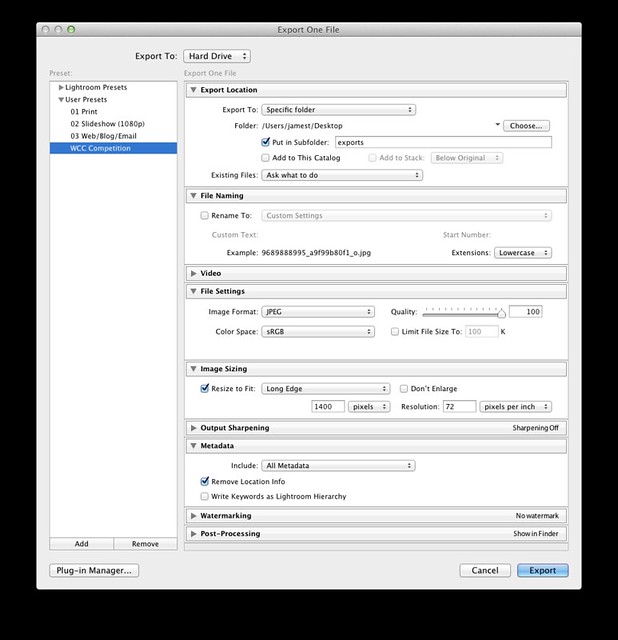
- Export Location
- Export To: {choose your favourite location, I usually put mine on the desktop}
- Check "Put in a Subfolder" and name it something like "exports" or "competition entries"
- File Settings
- Image Format: JPEG
- Quality: {set between 90-100%}
- Colour Space: sRGB
- Image Sizing
- Check Resize to Fit: Select "Long Edge"
- Make sure "Don't Enlarge" is unchecked
- Type "1400" in the box and select "pixels" from the dropdown box
- Resolution: Type "72" in the box and select "pixels per inch" from the dropdown box
- Metadata
- Include: Select the level of Metadata you wish to include with your image, I usually select "All Metadata"
- Decide if you want to include "Location info"
- If this is your first time through, Click "Add" under the Preset box to save these settings for future exports.
- Click "Export" to export the selected images.
- Export Location
And you're done. For future exports you only need to select your images, go to the menu File -> Export..., select the preset you just saved and hit export.